

Colonizing in Aleryos goes through the Pillars, not a colony ship. A new planet gives you room to produce and build, but its value also depends on its resource modifiers, your quota, and what you are prepared to invest in it.
This guide explains how to found a colony, choose its purpose, and use the Forge or mining planets without confusing those mechanics. The reference rules remain in the colonization wiki.
When should you open a new colony?
Your home planet does not use a quota slot. Player level then unlocks up to eight colonies: one at levels 4, 8, 12, 16, 20, 24, 32, and 40. At level 40, you can therefore own nine planets without an additional bonus.
As a general rule, you can reach 10 planets with the required artifact. The Frontier Throne Fragment adds one colony only at artifact level 10 and from player level 20. If a quota is reduced afterwards, your planets stay active, but you can no longer colonize while you are at the cap.
Do not open a colony just because a slot is free. Prepare the required units, starting resources, and time to begin its first construction. An attractive colony becomes useful when it has a role: producing a resource, preparing ships, or acting as a logistics relay.
Founding a colony step by step
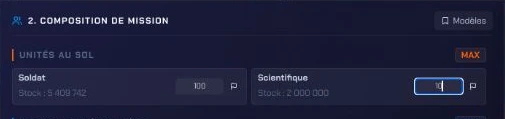
- 100 Soldiers
- 10 Scientists


- Prepare exactly 100 Soldiers and 10 Scientists on the departure planet.
- Keep the Pillars active on that planet.
- In the Galaxy, select a free planetary slot that offers the colonization action. Empty space between two objects is not necessarily colonizable.
- Launch the Colonization mission through the Pillars.
- Check the arrival: units are consumed only if colonization succeeds.
The target must be an unoccupied planetary slot. A planet, player, or PvE faction already present makes the attempt fail. A successful colony receives 500 Iron, 400 Crystal, and 200 Aether, its own active Pillars, building slots, and production modifiers rolled at foundation.
The Pillars guide explains their cost, activation, and other missions available.
Reading bonuses before investing
Every colony receives random modifiers for Iron, Crystal, and Aether. The game distributes a total bonus between +15% and +30%, as well as a total penalty between −0.1% and −30%, across the three resources. You can therefore have two resources with bonuses and one with a penalty, or one neutral resource.
These modifiers change the production base before technologies, faction, alliance, or other bonuses. A planet with strong Crystal keeps that advantage; it is naturally suited to investments that strengthen that resource.
Do not choose a colony for its biome: it is mainly visual. Two worlds in the same biome can have opposite bonuses. Also look at slots: a home planet has 240, a colony has between 180 and 240, and each Terraformer level adds 10.
Abandoning a colony without losing control
A colony can be abandoned if its roll does not suit you or your empire changes direction. The home planet can never be abandoned. Abandonment requires entering ABANDONNER, starts a one-hour countdown, and can be cancelled before it ends. An active linked fleet can prevent it from starting.
During the countdown, the colony remains viewable. Recolonizing will once again require 100 Soldiers and 10 Scientists. Check the bonus, slots, and linked fleets before confirming.
Improving a planet with the Forge
- 7 Mnesic Substrates
- 5 Pillar Ceramics
- 3 Breach Condensates



The Forge requires you to have selected a faction. For a planet, it lets you craft a Planetary Stabilizer for 7 Mnesic Substrates, 5 Pillar Ceramics, and 3 Breach Condensates, obtained in Excavations.
First select the planet to improve, then install the Stabilizer. The item is consumed and permanently adds one percentage point to that planet's Iron, Crystal, or Aether. It works on a penalty, a zero value, or a bonus. The home planet is eligible; there is neither a cap nor an escalating cost.
Install it on a planet you intend to keep. If you abandon a colony, its effect disappears without a refund. The production wiki details the order in which this bonus enters the production calculation.

Exploiting mining planets
Mining planets are temporary and are not colonies. They contain one resource, can be exploited by several players, and disappear when their stock is exhausted.
You need an Orbital Drill, built in Specialized Devices. It requires Space Yard level 12, Infrastructure and Hull technologies at level 10, and Orbital Drilling level 1. The first mission nevertheless requires Orbital Drilling level 2; every two additional levels open one more simultaneous mission.
A mission takes exactly one Drill and up to 200,000 Miners. Its rate is fixed at launch and also depends on the technology associated with the resource. The Drill has a base hold of 18,000,000 units, improved by freight bonuses. The mission occupies a global quota slot during travel out, drilling, and return: plan for it before sending your other fleets.
Resources are credited only on return to the original planet. The fleet returns automatically if its hold is full or the stock is exhausted; manual recall remains possible. The same player can keep only one active mission on the same mining planet, even though several players can exploit it in parallel. Consult the mining-planets guide before mobilizing your Miners.
Moving a planet
The Planetary Teleporter can move one of your planets, including the home planet, to free coordinates. During its first distribution phase, it comes from compatible loot and rewards, not from the store. After the move, no new departure can be launched from that planet for 30 minutes. The same planet waits 45 days before another move; there must also be 48 hours between two moves, and the account is limited to three over 30 days.
It does not replace colonization: it is used to reorganize an empire that is already established. Check the destination, delays, and your other moves before using it.
If you come from OGame
Colonization follows a different logic: there is no colony ship. You found a world through the Pillars with a specific population. Production bonuses are rolled at foundation, then the Forge can permanently strengthen one resource on the planet you decide to keep.
Frequently asked questions
How do I colonize a planet?
Send exactly 100 Soldiers and 10 Scientists through the Pillars to a free planetary slot. They are consumed only on success.
How many planets can I have?
As a general rule, you can reach 10 planets with the required artifact. At player level 40, you have eight colonies plus your home planet, for nine planets without this artifact. The Frontier Throne Fragment adds one colony only at artifact level 10 and from player level 20.
Does the biome change production?
No. The biome is mainly visual. The Iron, Crystal, and Aether modifiers rolled at foundation are what guide production.
What does the Planetary Stabilizer do?
It permanently adds one percentage point to one resource on the selected planet. The improvement is lost without refund if you abandon that colony.
Can I abandon a colony?
Yes. After you confirm the action, a one-hour delay begins and you can still cancel it. The home planet cannot be abandoned.
For more information: planet characteristics, mining planets, and defending your planets.