
Imagine opening an empire game in a waiting room to send resources from one planet to another. You choose a destination, ships and cargo. Just before you confirm, someone speaks to you and you put your phone away. When you return, the strategic question has changed: did the order go through, or do you still need to send it?
Mobile comfort is about more than an uninterrupted session. It also matters when you return to an interrupted action. A readable map helps, but knowing what the game did with your command matters more than fitting every panel on the screen.
Comfort starts when you send an order
A transport is not a single button. It involves an origin, a destination, a fleet and sometimes cargo and a route. On a phone, these choices often come one after another. If the screen loses the target or selection when you go back, you have to reconstruct your plan before you can even confirm it.
So the key question is not just “Are the buttons big enough?” but “Can I review the important details before I commit?” The destination and what you are sending should remain clear, and the final confirmation should be distinct from a selection tap. Clear touch controls help keep a slip of the finger from becoming an unintended strategic choice. If you are moving a unit, for example, movement should be easy to distinguish from selection: on a narrow screen, confusing the two could change the target without you noticing.
When your screen is off, alerts are secondary
In a persistent strategy game, an operation can continue while the screen is off. A notification may help you notice an event, but it depends on the channel and your phone’s permissions; it should not be the only way to understand your game. Otherwise, declining alerts or switching to silent mode would leave you playing blind.
OGame illustrates how the access method can matter: Gameforge distinguishes push notifications from its mobile app and notifications offered by a browser. That detail does not make one format the universal winner; it shows that the alert channel is part of the app-versus-browser choice. The more important question is what you find when you open the game, whether or not an alert arrived.
When you return, recover the state before repeating an action
Return to the hypothetical transport. When you open the game again, you should be able to tell whether the order was never sent, is underway or has finished. For an operation that is underway or complete, a visible destination and status save you from searching through several screens. If the order was never sent, a clear indication keeps you from assuming the cargo is already moving.
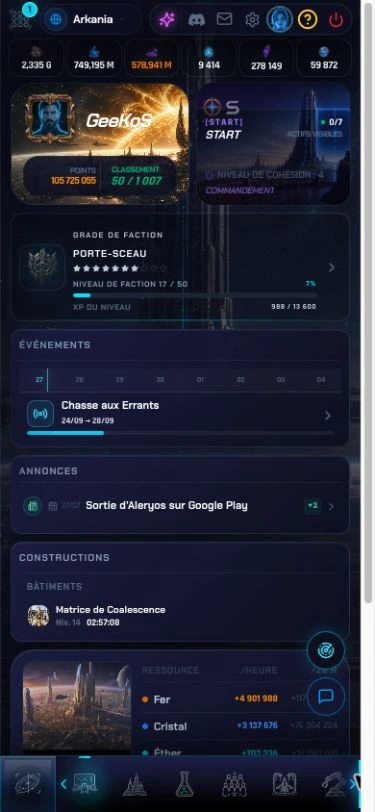
In Aleryos, the current overview brings together events, announcements and construction in progress. The screenshot below is a 375-pixel-wide responsive browser view of Aleryos in French; the construction panel includes a building, its level and the remaining time. That can help you find the development already under way before you leave the game. A transport raises a different question, which belongs in mission tracking. A useful dashboard helps, but it does not replace the details of the operation you want to check.
Picking up where you left off does not require a full account of everything that happened while you were away. It requires enough information to continue the decision without repeating your steps: which operation is active, where it is going and whether it still needs anything from you. A notification can get your attention; the game state should answer your question. That is what lets short, interrupted sessions work with a strategy game instead of turning each return into an investigation.

App, browser and PC: compare continuity
An app can offer touch controls and built-in alerts. A browser strategy game opens without installing an app, but an interface designed for a large screen may be awkward to use by touch. None of these formats alone guarantees that the same actions, information or account will be available everywhere.
If you expect to switch between phone and computer, the decisive test is continuity: can you find the same account, the same game state and the operations already in progress, then understand what has changed? Do not confuse “the site opens” with “I can pick up my plan.” Our guide to browser strategy games looks at what the access method changes—and what it does not tell you about the game itself.
Choose based on when you will play
Before committing to your next game, try this simple four-step check:
- Open an order screen and see whether the target and the resources involved are clear before you confirm anything.
- Without submitting the order, leave the screen and return. Check which selections were saved and which you would need to enter again.
- Open the tracking view for an operation already under way. Look for its destination and status without relying only on a notification.
- If you switch between phone and PC, check that you can find the same account and operation on the other device.
This check shows whether the game is easy not only to open on your phone, but also to resume between activities without repeated guesswork.
If you mainly want to launch operations while you are out, first look for a readable target and a clear order confirmation. If you check in between activities and plan on a PC later, prioritize recovering the game state and account continuity. Choose the game that lets you pick up your decision—not just the one that fits in your pocket.